Choosing the right amount of RAM can feel like solving a puzzle. Whether you’re a casual user, a gamer, or a professional using resource-heavy software, your PC’s performance depends heavily on having adequate RAM. But how much is enough? Is 8GB still the standard, or should you consider 16GB, 32GB, or even more?
This guide will walk you through everything you need to know about RAM—from its role in your PC to how much you need for specific tasks like gaming, multitasking, and professional applications.
What Is RAM and Why Is It Important?
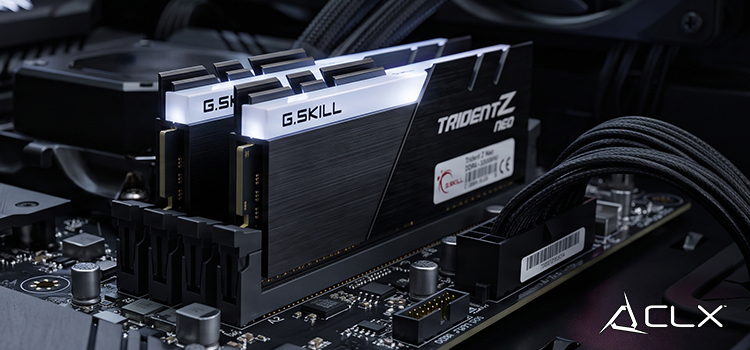
RAM, or Random Access Memory, is your computer’s short-term memory. It temporarily stores data your PC needs to access quickly. Unlike your hard drive or SSD, RAM doesn’t retain information once your PC is powered off.
The more RAM your system has, the more tasks it can handle simultaneously without sacrificing speed. When your PC runs out of RAM, it turns to your slower storage drive for help, which can significantly bottleneck performance.
Simply put, RAM is crucial for ensuring your PC runs smoothly during anything from basic tasks to demanding workloads.
Understanding Different Types of RAM
Not all RAM is created equal, and choosing the right type is as vital as choosing the right amount.
DDR4 vs. DDR5
- DDR4: The most commonly used type of RAM today, offering a balance of performance and affordability.
- DDR5 (Emerging): Faster and more efficient than DDR4, but still relatively new and expensive. Ideal for cutting-edge systems with compatible motherboards.
Factors That Matter When Buying RAM
- Capacity: Measured in gigabytes (GB), determines how much data can be stored temporarily.
- Frequency (Speed): Measured in MHz, higher frequencies can improve performance, especially in gaming or intensive applications.
- Latency: Lower latency means faster communication between your system and RAM.
RAM Requirements for General Use and Multitasking
If you’re a casual PC user browsing the web, checking emails, or working on documents, your RAM requirements are more modest.
4GB of RAM
- Suitable for very basic tasks like word processing or lightweight browsing.
- Runs out of steam quickly with multitasking or modern software.
8GB of RAM
- Ideal for everyday use with some multitasking, such as running a web browser with multiple tabs open alongside basic applications.
- Minimum recommendation for budget systems.
16GB of RAM
- The sweet spot for multitasking and productivity.
- Ideal for users who regularly use multiple apps simultaneously, stream content, or perform light photo editing.
RAM for Gaming: What’s the Sweet Spot?
Gamers often need more RAM to handle modern titles, especially those with detailed textures and demanding environments.
8GB
- Works for older or less demanding games.
- Not ideal for AAA games released in the last few years.
16GB
- The gold standard for gaming in 2025.
- Ensures smooth performance for most AAA titles, supporting multitasking like streaming and running background apps.
32GB or More
- Recommended for enthusiast gamers who use resource-intensive mods, stream content, or run high-refresh-rate 4K setups.
- Future-proofs your rig for upcoming game releases.
Quick Tip for Gamers
While capacity is important, don’t overlook RAM speed. Games like “Cyberpunk 2077” and “Starfield” perform noticeably better with high-speed RAM (3,200MHz or higher).
RAM for Professional Tasks
For professionals running demanding software, such as video editing or 3D rendering tools, basic RAM setups won’t cut it.
Video Editing and Graphic Design
- 16GB: Suitable for light editing with lower-resolution projects.
- 32GB: Essential for 4K video editing or working with high-res design files in Adobe Premiere or Photoshop.
- 64GB or More: For professionals rendering 8K video or working with large-scale projects that rely on extensive assets.
3D Modeling and Rendering
- Applications like Blender, Maya, or AutoCAD require significant amounts of RAM. A minimum of 32GB is often recommended, with 64GB or more being ideal for complex models.
Data Analysis and Machine Learning
- If you’re crunching massive datasets, RAM requirements can climb quickly. A minimum of 32GB is suggested, while 64GB or more may be necessary for advanced workloads.
The Role of RAM Speed
Faster RAM speeds can improve performance, but how much do they matter?
Gaming
High-speed RAM (3,200MHz or above) can provide a small but noticeable boost in FPS for certain games, especially in CPU-intensive titles like strategy games. However, don’t go overboard chasing ultra-high frequencies unless your setup demands it.
Professional Applications
Applications like rendering software benefit more from higher RAM capacity than speed. That said, faster RAM can still help reduce lag in tasks like simulation or 3D animation.
Everyday Use
For general users, the impact of RAM speed is minimal. The difference between 2,400MHz and 3,200MHz may be imperceptible.
Can You Have Too Much RAM?
Technically, no, but practically, yes. Unused RAM is essentially wasted. For instance, if you’re casually browsing the web, having 64GB of RAM won’t provide any noticeable performance improvement over 8GB.
Additionally, there’s a diminishing return on performance once you hit the RAM sweet spot for your specific use case. Instead of overspending on excessive RAM capacity, consider allocating that budget toward a better GPU or faster SSD, which can have a more significant impact on overall performance.
The Final Verdict: How Much RAM Should You Get?
Ultimately, how much RAM your PC needs boils down to how you use it. Here’s a quick summary of our recommendations for 2024:
- Basic Use and Multitasking: 8GB (minimum) or 16GB (recommended).
- Gaming: 16GB (sweet spot) or 32GB (for future-proofing).
- Professional Work: 32GB (minimum) or 64GB+ (for heavy workloads).
Having the right balance between capacity and speed ensures smooth performance tailored to your needs. Be mindful of your motherboard’s compatibility and upgrade potential when making your decision.
If you’re ordering a PC or upgrading your current setup, investing wisely in RAM will pay off in both productivity and enjoyment.
About Us
CLXGaming is a PC builder based in Wichita, KS that builds prebuilt PCs, custom PCs and laptops for all of your gaming and creative needs. We work with any budget and offer flexible gaming PC financing.