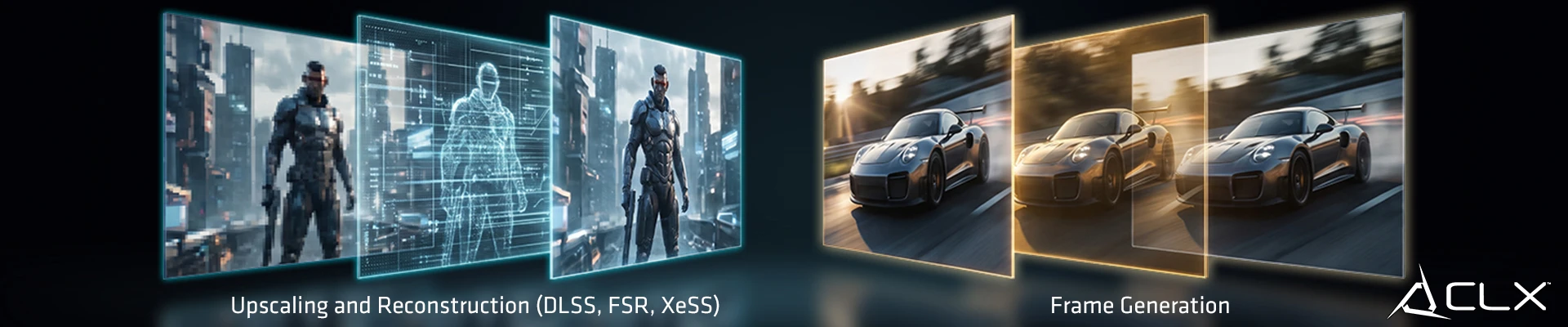
Quick answer: DLSS, FSR, and XeSS render a game at a lower internal resolution, then use an algorithm to reconstruct detail at your display's native resolution. Frame Generation goes further and inserts synthetic frames the GPU never fully rendered. All four trade some image quality or input latency for a higher frame counter. None of them make a GPU faster.
That distinction matters more than the marketing slides suggest. A spec sheet that lists "DLSS 4 support" or "FSR 3 ready" tells you a feature exists. It tells you nothing about how that feature performs in the games you actually play, at the settings you actually use.
What is DLSS, and how is it different from FSR and XeSS?
DLSS is Nvidia's upscaling technology, trained on Nvidia's own supercomputers and run through the Tensor cores on RTX GPUs. FSR is AMD's version, built to run on a wider range of hardware, including non-AMD GPUs, because it doesn't depend on dedicated AI cores. XeSS is Intel's entry, which runs best on Arc GPUs using their XMX cores but also has a fallback mode for other cards.
All three do the same basic job: render fewer pixels, then guess the rest. The quality of that guess is what separates them, and it varies by game, not just by vendor.
What does Frame Generation actually insert into the image?
Frame Generation doesn't upscale an existing frame. It analyzes two real, fully rendered frames and builds a new frame in between them that the GPU never computed from scratch. That new frame boosts the number on your counter, but it adds a step of latency and can introduce visual artifacts around fast-moving objects, especially UI elements like health bars or crosshairs. A frame your GPU didn't render from game data is not the same as a frame it did. Reviewers online have documented this latency cost directly, which is why competitive shooters are a worse fit for Frame Gen than cinematic single-player titles.
Does turning on DLSS or FSR mean my GPU is faster?
No. The GPU is doing less rendering work per displayed frame, not more work per second. An RTX 4070 running DLSS at Quality mode will show a higher frame rate than native rendering, but the underlying silicon hasn't changed. This is why GPU utilization readings during upscaled gameplay can look lower even though the game feels smoother. It's a workload change, not a performance upgrade.
That confusion shows up constantly on our bench. We've pulled builds in for diagnosis where a customer assumed a GPU was defective because utilization sat under 80% with upscaling on and no frame cap. The GPU wasn't underperforming. It was doing exactly what Frame Generation and upscaling ask it to do: less native rendering, filled in with reconstruction.
Which one should I care about when buying a prebuilt?
Treat upscaling support as a checkbox, not a selling point. The real question is whether the builder tested the specific games you play with the specific GPU in your build, at native resolution first, with any frame cap disabled during diagnosis. A spec sheet that lists "DLSS supported" without a benchmark behind it is a feature list, not a performance claim. Read a prebuilt's listed specs against its own published test results before you trust either one.
If you’re shopping an RTX 5080 or RX 9070 XT build, confirm your case has clearance for the card and your PSU has headroom above its rated draw before you commit. Flagship cards run long and pull hard even before you add CPU load.
Compare GPU options on the CLX configurator before you decide what matters in your next build.
FAQ
Does DLSS or FSR reduce image quality?
Yes, to some degree, compared to native rendering. The reconstruction algorithm estimates missing detail, and how close that estimate gets to native quality depends on the mode selected (Quality, Balanced, Performance) and the game's implementation.
Can I use Frame Generation and upscaling together?
Yes, most current implementations allow stacking upscaling with Frame Generation. Stacking compounds both the frame rate gain and the latency cost, so it's a better fit for single-player games than fast multiplayer shooters.
Will a more expensive GPU make upscaling look better?
Not directly. Upscaling quality is mostly a software and training-data question, not a raw horsepower question. A faster GPU gets you more headroom to run native resolution without needing upscaling at all, which is a different kind of benefit.