Total {{kit.components.memory.specs.capacity * kit.components.memory.qty}}GB - ({{kit.components.memory.qty}} x {{kit.components.memory.name}}) {{kit.components.memory.promo.text_a}}
CLX's workshop for crafting the elite, superior details defining the legendary CLX gaming systems. Refined customizations with bleeding-edge technology
CLX Quench: CPU Liquid Cooler Solutions: 120, 240, 360
CLX Forge: Professional CPU and GPU Overclocking Service
CLX Fluxx: Market Best Thermal Compound Application
CLX Temper: Custom Liquid Cooling Loops, soft and hardline
Get {{displayCurrency()}}{{displayNicePrice(100)[0]}}OFF Any Order over {{displayCurrency()}}{{displayNicePrice(1999)[0]}} with discount code BK2SCHOOLExpires in00:00:00
Get {{displayCurrency()}}{{displayNicePrice(200)[0]}}OFF Any Order over {{displayCurrency()}}{{displayNicePrice(3499)[0]}} with discount code BK2SCHOOLExpires in00:00:00
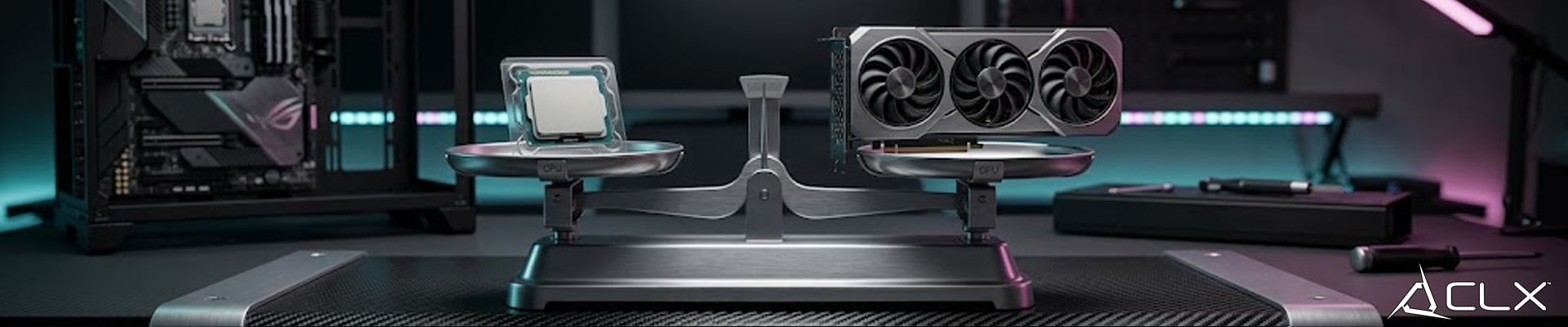
{"meta":{"description":"Gamers constantly chase higher frame rates, lower latency, and smoother overall performance. When your rig starts stuttering during intense firefights or struggling to load high-resolution textures, you face the ultimate hardware dilemma: do you upgrade your processor (CPU) or your graphics card (GPU)? Making the wrong choice means wasting money and leaving serious performance on the table."},"active":true,"show_in_home":true,"show_as_recent":false,"show_as_popular":false,"_id":"69f8d895732c2d82f3a2eac7","aid":"upgrade-cpu-or-gpu-guide","title":"Should You Upgrade Your CPU or GPU First?","sub_title":"Gamers constantly chase higher frame rates, lower latency, and smoother overall performance.","sid":"pc-parts-benchmark","date":"05/04/2026","elements":[{"_id":"69f8d895732c2d82f3a2eac8","id":"p0","sort_index":0,"type":"paragraph","content":"<p><br data-mce-bogus='1'></p><p><br data-mce-bogus='1'></p><p>Gamers constantly chase higher frame rates, lower latency, and smoother overall performance. When your rig starts stuttering during intense firefights or struggling to load high-resolution textures, you face the ultimate hardware dilemma: do you upgrade your processor (CPU) or your graphics card (GPU)? Making the wrong choice means wasting money and leaving serious performance on the table.</p><p>You need facts, not guesswork. Here’s exactly how to determine which component is holding your system back and where to invest your money for maximum frame rates.</p><p><br data-mce-bogus='1'></p><p><br data-mce-bogus='1'></p><p><span style='font-size: 18pt; color: rgb(224, 62, 45);' data-mce-style='font-size: 18pt; color: #e03e2d;'><strong>Understanding the Role of the CPU</strong></span></p><p>The CPU is the brain of your gaming PC. It handles game logic, physics calculations, NPC artificial intelligence, and—most importantly—it feeds data and draw calls to your graphics card. If your processor is too slow, your GPU sits idle waiting for instructions. You’ll notice this as stuttering, inconsistent frame pacing, 1% lows, and sudden frame rate drops in complex scenes (especially in CPU-heavy games like strategy titles, open-world RPGs, or simulation games).</p><p><br data-mce-bogus='1'></p><p><br data-mce-bogus='1'></p><p><span style='font-size: 18pt; color: rgb(224, 62, 45);' data-mce-style='font-size: 18pt; color: #e03e2d;'><strong>Understanding the Role of the GPU</strong></span></p><p>The GPU is the raw muscle of your system. It takes instructions from the CPU and renders the pixels, textures, shadows, lighting, and effects that you see on screen. High resolutions (1440p or 4K), high texture/ray tracing settings, or demanding visual effects require massive rendering power. If your game turns into a slideshow when you crank up graphics settings, your GPU is the bottleneck.</p><p><br data-mce-bogus='1'></p><p><br data-mce-bogus='1'></p><p><span style='color: rgb(224, 62, 45); font-size: 18pt;' data-mce-style='color: #e03e2d; font-size: 18pt;'><strong>How to Identify Your Bottleneck</strong></span></p><p>Before buying new hardware, analyze how your machine actually performs under load.</p><p><strong>Monitor your system</strong> while playing your most demanding game. Use tools like <strong>MSI Afterburner + RTSS</strong>, <strong>HWInfo</strong>, or <strong>CapFrameX</strong> and enable on-screen overlays.</p><ul><li><strong>GPU Bottleneck</strong> (most common at 1440p/4K): Your <strong>GPU usage is at or near 99–100%</strong>, while your <strong>CPU usage stays in the mid-to-low range</strong> (e.g., 40–70%). → The GPU is working at full capacity and can’t render frames any faster. This is the ideal situation in many ways (you’re getting the most out of your graphics card), but it means the GPU is holding you back.<br><br></li><li><strong>Solution:</strong> Upgrade your GPU.</li><li><strong>CPU Bottleneck</strong>: Your <strong>CPU usage is at or near 100%</strong> (especially on main threads), while your <strong>GPU usage is significantly lower</strong> (e.g., 50–80%). → The CPU can’t feed the GPU fast enough, so the GPU is left waiting. You’ll see more stuttering and lower 1% lows.</li></ul><p><br></p><ul><li><strong>Solution:</strong> Upgrade your CPU (or improve cooling, lower settings that stress the CPU, or reduce resolution slightly).</li></ul><p><strong>Pro tip:</strong> In CPU bottlenecks you often see lower GPU usage. The goal in most gaming scenarios is actually <strong>high GPU usage (close to 100%)</strong> with headroom on the CPU. That means your graphics card is being fully utilized.</p><p><strong><br data-mce-bogus='1'></strong></p><p><span style='color: rgb(224, 62, 45); font-size: 14pt;' data-mce-style='color: #e03e2d; font-size: 14pt;'><strong>Other Factors to Consider When Upgrading</strong></span></p><p><strong><br data-mce-bogus='1'></strong></p><p><strong>Your Current Resolution & Settings</strong></p><ul><li>1080p → More likely to be CPU-bound.</li><li>1440p/4K → More likely to be GPU-bound.</li></ul><p><strong><br data-mce-bogus='1'></strong></p><p><strong>Your Primary Use Case</strong></p><ul><li><strong>Pure gaming</strong> at high resolutions and graphics settings → Prioritize GPU.</li><li><strong>Streaming, video editing (Premiere Pro, DaVinci), 3D rendering, or multitasking</strong> → CPU cores, threads, and cache matter a lot more. A strong multi-core CPU (like Ryzen 7/9 or Core i7/i9) becomes critical.</li></ul><p><strong><br data-mce-bogus='1'></strong></p><p><strong>Budget & Future-Proofing<br><br></strong>If you’re on a tight budget, fixing the bigger bottleneck first gives the best immediate gains. Also consider your platform: upgrading CPU may require a new motherboard + RAM (AM5 or new Intel platform), while GPU upgrades are usually plug-and-play.</p><p><strong><br data-mce-bogus='1'></strong></p><p><strong>Quick Decision Guide</strong></p><ul><li>GPU at 99% + CPU <70% → <strong>Upgrade GPU first</strong>.</li><li>CPU at 95–100% + GPU <80% → <strong>Upgrade CPU first</strong>.</li></ul><p>Both high → Balanced system, but you may still benefit from upgrading either (or both).<br></p><p><br data-mce-bogus='1'></p><p><br data-mce-bogus='1'></p><p><br data-mce-bogus='1'></p>"}],"big_image_path":"upgrade-cpu-or-gpu-guide-big.jpg","mid_image_path":"upgrade-cpu-or-gpu-guide-mid.jpg","small_image_path":"upgrade-cpu-or-gpu-guide-small.jpg","created":"2026-05-04T17:34:13.111Z","updated":"2026-05-05T20:35:58.358Z","__v":2}