When it comes to constructing the perfect gaming setup, every ounce of performance matters. This is an era where the very fabric of gaming – the transitions between worlds, the load times, and the mere speed at which you can get your frag on – hinges on the storage solution you pick.
This blog post is your ultimate megathread dissecting the critical question that could define your next PC build: SSD or HDD? Gamers, it's time to gear up and make an informed choice as we wade through speed, capacity, and the overall impact on your gaming experience.
Understanding the Basics
Before the click of a mouse or the thwack of a controller, the backbone of your gaming system lies within its storage. But what is the fundamental difference between Solid-State Drives (SSDs) and Hard Disk Drives (HDDs)?
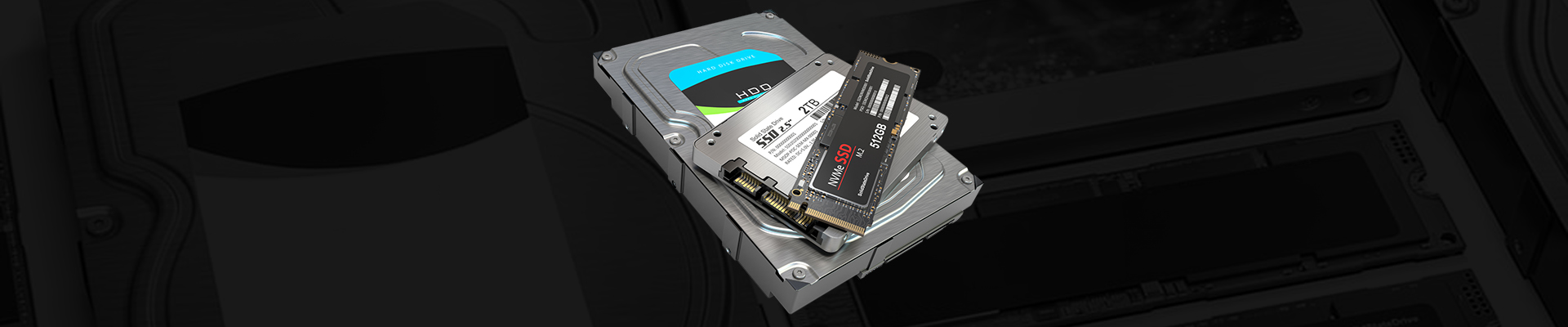
SSDs are the new kids on the block, utilizing flash storage that contains no moving parts. Much like a glorified USB, SSDs provide an instant link to your data, drastically reducing boot and load times. On the flip side, HDDs are your traditional storage medium, replete with spinning disks and mechanical arms that read and write data. While they can hold their own in storage capacity, they lack the sheer speed of SSDs.
Speed and Performance: A Cat and Mouse Story
Speed is the essence. It's what brings snappy start-ups, seamless graphics, and breakneck performance. In our comparison, SSDs emerge as the clear speed demons, boasting read/write speeds up to 100 times faster than traditional HDDs. In gaming terms, this translates to SSDs launching games and moving between levels with one less lap around the loading screen.
The Loading Screen Challenge
To put it succinctly:
- SSDs : Enters the game in a flash, almost instantly.
- HDDs : A reliable workhorse, but takes time to gallop into the digital world.
Case in point, a game like 'Red Dead Redemption 2' loaded substantially faster on SSDs – a difference so clear that it could rearrange the gamer's perception of time itself, in their favor.
Real vs Ideal
In an ideal setup, you'd have the operating system and your most-played games residing on an SSD for that extra speed burst. Use the HDD to store your larger data sets, archives, and other games. However, realism creeps in with budget constraints. That’s when choosing your battles becomes crucial – which few games in your arsenal truly need the lightning touch of an SSD?
Capacity and Cost Quotient
An unswerving presence, capacities are where HDDs throw their weight around. They offer more storage for a lower cost, making them supremely competitive when it comes to the dollars-per-gigabyte metric. Meanwhile, SSDs are catching up, but for users with a trove of games, videos, and music, HDDs can still be the champions of cost-effective space.
Graphing Gigabytes
- SSDs : Typically top out at 4TB, with large capacity drives being bit pricier.
- HDDs : Vaults as vast as 18TB are in the market, with a significantly low cost.
For instance, an HDD set up is perfect for your game library that isn’t reliant on quick storage access – think strategy games or games with a significant amount of stored data.
Lifespan and Durability
In the quest for the perfect build, reliability should underscore every decision, especially under the relentless usage patterns of a hardcore gamer.
A Study in Wear and Tear
- SSDs : Flourish in the sustainability terrain; no moving parts means lesser wear.
- HDDs : Mechanical arms, magnetism, and rapidly spinning disks – a trifecta vulnerable to shocks and wear.
It’s clearer now why SSDs are commonly termed as more durable. In gaming terms, this translates to a longer lifespan with consistent performance, even over years of use.
Gaming in the Balance
Storage isn’t just about saving, after all, it's about creating a lifelike environment for your games. The dialogue here isn’t just SSD vs. HDD; it’s about the subtler nuances of frame rates, parallel calculations, and graphics quality.
The Unseen Role
An SSD means your games can access data faster, potentially sparing you from mobile environmental pop-in and retaining a consistent high-quality texture, especially in open-world games where you're continually on the move.
The Frame Rate Story
Though not directly related, quicker storage can affect load times within the game, thereby leaving the processor and GPU freer to concentrate on the game's performance, aiming for a smoother, drop-free experience.
Future Trends and Closing Recommendations
The quest for the best storage doesn’t end with SSD or HDD. The emergence of NVMe and hybrid drives introduces an array of solutions that blend the best of both worlds. For the gamer building a system on a budget, hybrids can serve as an excellent compromise, offering a considerable performance boost over standard HDDs at a fraction of the cost of an SSD.
In conclusion, it’s not just about choosing sides but about understanding your needs as a gamer. If you value quick loading, snappy OS, and are willing to pay a premium, SSDs are for you. However, if you want to store a vast library or have a more extensive writing workload, HDDs provide an option with unbeatable cost-per-gigabyte value. And remember, there’s always room for compromises with hybrids and future options like NVMe to give you a little bit of everything.
The Final Level
In the realm of gaming, the build is your castle; and like every domain, it deserves a sturdy foundation. The SSD and the HDD are not mere components; they are instruments shaping the very essence of your gaming voyage.
Go forth, equipped with knowledge and confidence. Whether it be the swiftness of the SSD or the storage of the sturdy HDD, your choice will resonate through the pixels and processors, crafting a gaming experience uniquely and astutely yours.
It’s not about whether you choose an SSD or an HDD; it’s about the game you want to play and honing your system to play it just right.
About Us
CLXGaming is a PC builder based in Wichita, KS that builds prebuilt PCs, custom PCs and laptops for all of your gaming and creative needs. We work with any budget and offer flexible gaming PC financing.
If you would like more information about our PCs, please contact our customer support team at (855) 490-2569 or [email protected]. We pride ourselves on our excellent customer service and are happy to assist with your needs.