A gaming desk full of tangled cords makes even a great rig look sloppy. The good news: cleaning it up doesn't take a screwdriver or an afternoon inside your case. Every fix below deals with the cables running outside and around your PC, the ones you actually see every day.
Here's how to get there with simple, low-tech moves.
Start by mapping your cables
Before you buy anything, walk around your desk and actually look at every cable running outside your tower: power, monitor, peripherals, headset, speakers. Most people underestimate how many there are until they count.
Group similar cables together. Power cords in one bundle, data cables (USB, HDMI, DisplayPort) in another. Then look at your desk layout: where's the outlet, where's the monitor, where's the PC itself sitting. That tells you which routing path makes sense, usually along the back edge or down a desk leg, not across open floor.
Simple ways to bundle and route cables
A few low-cost tools handle most of the clutter:
- Cable sleeves or wraps. These bundle multiple cords into one neat tube, so instead of six loose wires you've got one.
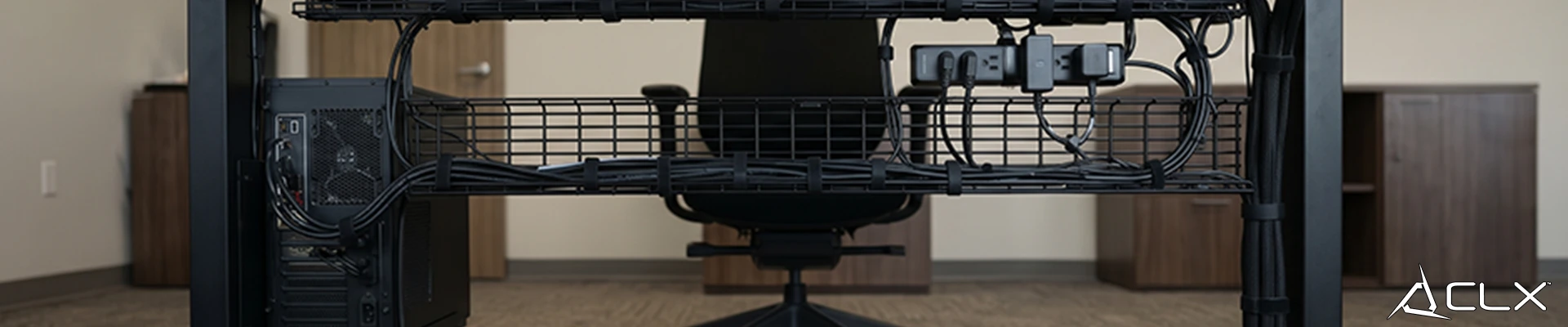
- Adhesive clips. Stick them along the underside or back edge of your desk to keep cables from drooping into view or snagging your feet.
- Cable trays or under-desk baskets. These hang beneath the desk and catch excess cable length, including the power strip itself.
- Routing behind furniture. Run cables behind your monitor stand or desk legs instead of across the front, where they're the first thing you see when you sit down.
None of this requires opening your PC. It's all about managing what's between the tower and the wall.
Use your furniture to hide cables for you
Your desk setup can do a lot of the hiding work before you even add cable management products.
Push your PC tower against a wall so the rear ports and their cables face away from the room. A monitor arm clears cable clutter off the desk surface entirely by lifting the screen and its cord up and back. A desk shelf, riser, or small cabinet placed strategically can block a cable run from view without rerouting anything. And a cable box or organizer tucked under the desk gives your power strip and chargers a home instead of a dangling mess.
Cut cables out of the picture entirely
The fewest cables to hide are the ones you don't have. Switching to a wireless keyboard and mouse removes two of the most-used cords on your desk. A wireless headset does the same for anything near your head and shoulders. Wireless charging pads can handle your phone if you're not gaming on it.
You'll still have power and display cables (those aren't going wireless anytime soon), but trimming the rest makes the remaining routing much easier to manage.
Small touches that make it look finished
Once the clutter's gone, a few details make the setup look intentional instead of just "not messy."
Pick cables that match your desk's color scheme, black, white, or clear, so even visible runs blend in. Cable covers with a metallic or matte black finish dress up anything that still crosses open floor. And if you've got more than a few cords bundled together, label them. It saves you from tracing wires later when you add a new monitor or swap peripherals.
A cleaner desk is worth the ten minutes
None of this takes special tools or technical know-how, just an hour, some clips, and a plan for where each cable actually needs to go. A clean desk doesn't just look better in photos. It's one less thing pulling your attention while you're trying to focus on the game in front of you.
If your setup needs more than a cable cleanup, our build configurator lets you spec a rig from the ground up, desk layout included.
FAQ
Do I need to open my PC to manage cables?
What's the cheapest way to hide gaming PC cables?
Will wireless peripherals really reduce desk clutter?