---
title: "Gaming RAM Guide: Stop Wasting Money on Memory You Don't Need | CLX Gaming: Best PC Builder for Custom & Prebuilt Gaming PCs"
description: "Every gamer knows the sinking feeling of a stuttering frame rate. It ruins immersion, kills your reaction time, and turns a competitive match into a slideshow."
canonical_url: "https://www.clxgaming.com/blog/pc-parts-benchmark/gaming-ram-guide-how-much-memory-do-you-need"
last_updated: "2026-05-19T14:02:04.439Z"
meta:
"og:description": "Every gamer knows the sinking feeling of a stuttering frame rate. It ruins immersion, kills your reaction time, and turns a competitive match into a slideshow."
"og:image": "https://static.cybertron.com/clx-v2/blog/articles/pc-parts-benchmark/gaming-ram-guide-how-much-memory-do-you-need/gaming-ram-guide-how-much-memory-do-you-need-big.webp"
"og:image:alt": "Gaming RAM Guide: Stop Wasting Money on Memory You Don't Need"
"og:title": "Gaming RAM Guide: Stop Wasting Money on Memory You Don't Need | CLX Gaming: Best PC Builder for Custom & Prebuilt Gaming PCs"
---
> Index of every page on this site: [llms.txt](https://www.clxgaming.com/llms.txt)
# Gaming RAM Guide: Stop Wasting Money on Memory You Don't Need
**CLXGAMING **03/11/2026
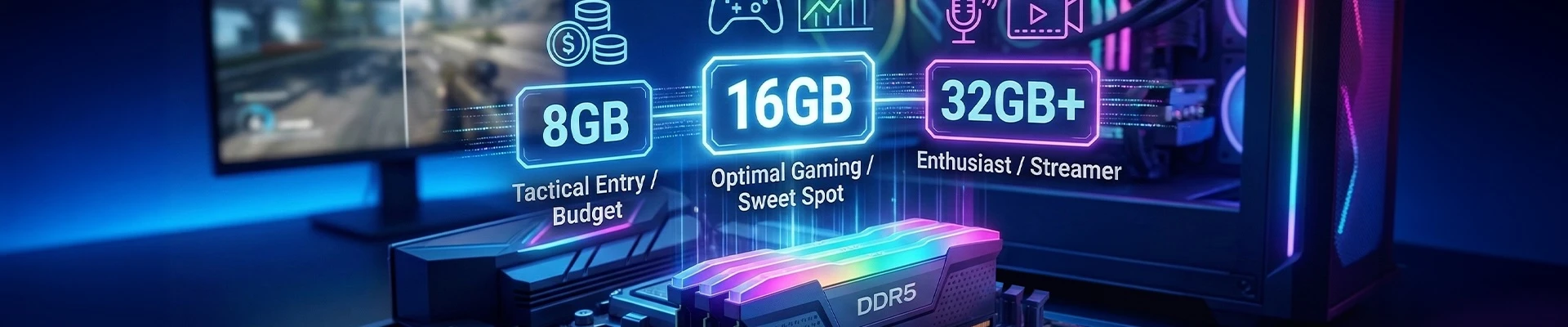
Every gamer knows the sinking feeling of a stuttering frame rate. It ruins immersion, kills your reaction time, and turns a competitive match into a slideshow. While the finger often points immediately at the [Graphics Processing Unit (GPU)](https://www.ibm.com/think/topics/gpu), your [System Memory (RAM)](https://www.dell.com/support/kbdoc/en-us/000148441/what-is-memory-ram) is the silent workhorse determining how smooth your experience actually is.
RAM stores the temporary data your PC needs to access instantly—game assets, textures, and OS processes. If you don't have enough, your system starts swapping data to your slower storage drive, tanking performance. But buying too much is just burning cash that could have gone toward a better [graphics card](https://www.nvidia.com/en-us/geforce/graphics-cards/).
With component prices fluctuating wildly, finding the right balance is critical for your build. Here is the definitive breakdown of how much RAM you actually need to game in 2026.
**The Strategic Baseline: Why 8GB Still Works**
Let's address the elephant in the room: hardware prices are high. Building a PC is an expensive investment, and blowing your budget on premium memory kits might force you to compromise on your CPU or GPU—components that are much harder to upgrade later.
8GB of RAM is the viable, tactical entry point for modern gaming.
If you primarily play [eSports titles](https://en.wikipedia.org/wiki/List_of_esports_games) like [*League of Legends*](https://www.leagueoflegends.com/en-us/), [*CS:GO*](https://www.counter-strike.net/), [*Valorant*](https://playvalorant.com/en-us/), or [*Dota 2*](https://www.dota2.com/home), 8GB may be sufficient to hit high frame rates. Even many modern AAA titles will run on 8GB, provided you manage your background applications effectively. The key advantage here is flexibility. RAM is the easiest component to upgrade. You can start with a single 8GB stick or a modest 2x4GB kit now to keep your initial build cost down. When prices stabilize or you save up more cash, slotting in more memory takes thirty seconds.
Don't let memory elitists tell you otherwise—8GB gets you in the game without emptying your wallet.
**The Sweet Spot: Why 16GB is the Standard**
For the vast majority of gamers, 16GB represents the optimal balance between cost and performance. This is currently the 'gold standard' recommended by most developers for running games at high settings.
With 16GB you gain significant breathing room. Games like Arc Raiders and Valorant consume massive amounts of memory to load high-resolution textures. At this capacity, you eliminate the [micro-stutters](https://www.youtube.com/watch?v=YWTZkB9rVU0) associated with [memory bottlenecks](https://sematext.com/glossary/memory-bottleneck/).
Crucially, 16GB allows for 'lazy' multitasking. You can keep a few browser tabs open, run [Discord](https://discord.com/) in the background, and have Spotify playing without your system choking. If your budget allows for it, this is the safe bet for a seamless experience in 2026.
**Enthusiast Territory: When to Consider 32GB+**
Is 32GB overkill? For a pure gaming machine, usually yes. But there are specific scenarios where this investment makes sense.
Consider 32GB if you fall into one of these categories:
- **The Streamer:** If you game while broadcasting via [OBS](https://obsproject.com/), managing chat, and running alerts, you are chewing through system resources.
- **The Sim Racer/Pilot:** Simulation games like [*Microsoft Flight Simulator*](https://www.flightsimulator.com/) or heavily modded [*Cities: Skylines*](https://store.steampowered.com/app/255710/Cities_Skylines/) are notorious memory hogs that can easily swallow 20GB+ of RAM.
- **The Content Creator:** If you edit 4K video or render 3D assets on the same machine you game on, 32GB moves from a luxury to a necessity.
For the average gamer simply looking to play the latest releases, 32GB provides negligible performance gains over 16GB. It is essentially future-proofing, not an immediate performance booster.
**Critical Factors Affecting Your RAM Needs**
Capacity isn't the only metric that matters. How you use your PC changes the equation.
**Resolution and Texture Quality**
Playing at [4K resolution](https://en.wikipedia.org/wiki/4K_resolution) requires larger texture assets than playing at [1080p](https://en.wikipedia.org/wiki/1080p). While [VRAM](https://en.wikipedia.org/wiki/Video_random-access_memory) (on your graphics card) handles much of this, system RAM still plays a role in shuttling that data. If you are gaming on a 4K monitor, you are more likely to benefit from capacities above 8GB.
**Background Bloatware**
The biggest enemy of gaming performance isn't the game itself—it's what else is running. Chrome tabs are notorious for eating RAM. [Electron apps](https://www.electronjs.org/apps) like Discord and [Slack](https://slack.com/) take their slice
**Final Verdict: Prioritize Your GPU**
Your gaming rig is a system of balances. Never sacrifice your GPU tier just to get excessive RAM capacity.
- **Build 8GB** if you are on a strict budget. It is a capable baseline that lets you put money where it matters most (the graphics card) while leaving the door open for an easy upgrade later.
- **Build 16GB** if you want a set-and-forget solution that handles every modern AAA title with ease.
- **Build 32GB** only if you are a streamer, a simulator enthusiast, or a content creator.
Analyze your specific needs, respect your budget, and build the machine that dominates your specific arena.
**About Us**
CLXGaming is a [PC builder](https://www.clxgaming.com/) based in Wichita, KS that builds [prebuilt PCs](https://www.clxgaming.com/pre-built-gaming-pc), [custom PCs](https://www.clxgaming.com/gaming-pc) and [laptops](https://www.clxgaming.com/gaming-laptops) for all of your gaming and creative needs. We work with any budget and offer flexible gaming [PC financing](https://www.clxgaming.com/financing).
If you would like more information about our PCs, please contact our customer support team at (855) 490-2569 or cs@clxgaming.com. We pride ourselves on our excellent customer service and are happy to assist with your needs.
## **Pc Parts Benchmark**
[**View all **](https://www.clxgaming.com/blog/pc-parts-benchmark)
[**CLXGAMING **10/21/2026**FPS Isn't Everything: The Numbers That Matter**
](https://www.clxgaming.com/blog/pc-parts-benchmark/fps-isnt-everything-the-numbers-that-matter) [**CLXGAMING **10/14/2026**What Is Overclocking? A Simple Guide for Beginners**
](https://www.clxgaming.com/blog/pc-parts-benchmark/what-is-overclocking-a-simple-guide-for-beginners) [**CLXGAMING **10/26/2026**DLSS, FSR, XeSS, and Frame Gen: What They Actually Do**
](https://www.clxgaming.com/blog/pc-parts-benchmark/dlss-fsr-xess-and-frame-gen-what-they-actually-do)
```json
{"@context":"https://schema.org","@graph":[{"@id":"https://www.clxgaming.com/#website","@type":"WebSite","alternateName":"CLX","description":"CLX Gaming builds custom and prebuilt gaming PCs, laptops, and professional workstations for gamers, creators, and PC professionals.","inLanguage":"en-US","name":"CLX Gaming: Best PC Builder for Custom & Prebuilt Gaming PCs","url":"https://www.clxgaming.com/","publisher":{"@id":"https://www.clxgaming.com/#identity"}},{"@id":"https://www.clxgaming.com/blog/pc-parts-benchmark/gaming-ram-guide-how-much-memory-do-you-need#webpage","@type":"WebPage","dateModified":"2026-05-19T14:02:04.439Z","datePublished":"2026-03-11T15:00:00.000Z","description":"Every gamer knows the sinking feeling of a stuttering frame rate. It ruins immersion, kills your reaction time, and turns a competitive match into a slideshow.","name":"Gaming RAM Guide: Stop Wasting Money on Memory You Don't Need","url":"https://www.clxgaming.com/blog/pc-parts-benchmark/gaming-ram-guide-how-much-memory-do-you-need","breadcrumb":{"@id":"https://www.clxgaming.com/blog/pc-parts-benchmark/gaming-ram-guide-how-much-memory-do-you-need#/schema/breadcrumb-list/#breadcrumb"},"isPartOf":{"@id":"https://www.clxgaming.com/#website"},"potentialAction":[{"@type":"ReadAction","target":["https://www.clxgaming.com/blog/pc-parts-benchmark/gaming-ram-guide-how-much-memory-do-you-need"]}],"primaryImageOfPage":{"@id":"https://www.clxgaming.com/#logo"}},{"@id":"https://www.clxgaming.com/#identity","@type":"Organization","name":"CLX Gaming","telephone":"+1-855-490-2569","url":"https://www.clxgaming.com","address":{"@type":"PostalAddress","streetAddress":"4747 S Emporia St","addressLocality":"Wichita","addressRegion":"KS","postalCode":"67216","addressCountry":"US"},"contactPoint":[{"@type":"ContactPoint","telephone":"+1-855-490-2569","contactType":"customer service","contactOption":"TollFree","areaServed":"US","availableLanguage":"en"},{"@type":"ContactPoint","telephone":"+1-855-490-2569","contactType":"sales","contactOption":"TollFree","areaServed":"US","availableLanguage":"en"},{"@type":"ContactPoint","telephone":"+1-316-303-1022","contactType":"corporate","areaServed":"US","availableLanguage":"en"}],"hasMerchantReturnPolicy":{"@type":"MerchantReturnPolicy","applicableCountry":"US","returnPolicyCategory":"https://schema.org/MerchantReturnFiniteReturnWindow","merchantReturnDays":30,"returnMethod":"https://schema.org/ReturnByMail","restockingFee":15,"merchantReturnLink":"https://www.clxgaming.com/warranty"},"logo":{"@id":"https://www.clxgaming.com/#logo"},"sameAs":["https://www.facebook.com/clxgaming","https://x.com/clxgaming","https://www.youtube.com/clxgaming","https://www.twitch.tv/clxgamingtv/","https://www.pinterest.com/CLXGaming/","https://www.instagram.com/clxgaming"]},{"@id":"https://www.clxgaming.com/blog/pc-parts-benchmark/gaming-ram-guide-how-much-memory-do-you-need#/schema/breadcrumb-list/#breadcrumb","@type":"BreadcrumbList","itemListElement":[{"@type":"ListItem","name":"Home","item":"https://www.clxgaming.com/","position":1},{"@type":"ListItem","name":"Blog","item":"https://www.clxgaming.com/blog","position":2},{"@type":"ListItem","name":"Pc Parts Benchmark","item":"https://www.clxgaming.com/blog/pc-parts-benchmark","position":3},{"@type":"ListItem","name":"Gaming RAM Guide: Stop Wasting Money on Memory You Don't Need","item":"https://www.clxgaming.com/blog/pc-parts-benchmark/gaming-ram-guide-how-much-memory-do-you-need","position":4}]},{"@id":"https://www.clxgaming.com/blog/pc-parts-benchmark/gaming-ram-guide-how-much-memory-do-you-need#article","dateModified":"2026-05-19T14:02:04.439Z","datePublished":"2026-03-11T15:00:00.000Z","description":"Every gamer knows the sinking feeling of a stuttering frame rate. It ruins immersion, kills your reaction time, and turns a competitive match into a slideshow.","headline":"Gaming RAM Guide: Stop Wasting Money on Memory You Don't Need","inLanguage":"en-US","thumbnailUrl":"https://static.cybertron.com/clx-v2/blog/articles/pc-parts-benchmark/gaming-ram-guide-how-much-memory-do-you-need/gaming-ram-guide-how-much-memory-do-you-need-small.webp","@type":["Article","BlogPosting"],"articleSection":["Pc Parts Benchmark"],"author":{"@id":"https://www.clxgaming.com/#identity"},"image":["https://static.cybertron.com/clx-v2/blog/articles/pc-parts-benchmark/gaming-ram-guide-how-much-memory-do-you-need/gaming-ram-guide-how-much-memory-do-you-need-big.webp","https://static.cybertron.com/clx-v2/blog/articles/pc-parts-benchmark/gaming-ram-guide-how-much-memory-do-you-need/gaming-ram-guide-how-much-memory-do-you-need-mid.webp","https://static.cybertron.com/clx-v2/blog/articles/pc-parts-benchmark/gaming-ram-guide-how-much-memory-do-you-need/gaming-ram-guide-how-much-memory-do-you-need-small.webp"],"isPartOf":{"@id":"https://www.clxgaming.com/blog/pc-parts-benchmark/gaming-ram-guide-how-much-memory-do-you-need#webpage"},"keywords":[],"mainEntityOfPage":{"@id":"https://www.clxgaming.com/blog/pc-parts-benchmark/gaming-ram-guide-how-much-memory-do-you-need#webpage"},"publisher":{"@id":"https://www.clxgaming.com/#identity"}},{"@id":"https://www.clxgaming.com/#logo","@type":"ImageObject","caption":"CLX Gaming","contentUrl":"https://static.cybertron.com/clx-v2/footer/clx-footer-icon-red.webp","inLanguage":"en-US","url":"https://static.cybertron.com/clx-v2/footer/clx-footer-icon-red.webp"}]}
```
## Sitemap
See the full [sitemap](https://www.clxgaming.com/sitemap.md) for all pages.