---
title: "144Hz vs. 240Hz vs. 360Hz: Can You Actually Tell? | CLX Gaming: Best PC Builder for Custom & Prebuilt Gaming PCs"
description: "Yes, past a point, but it depends on the game and your GPU's ability to hit the frame rate that monitor needs."
canonical_url: "https://www.clxgaming.com/blog/pc-parts-benchmark/144hz-vs-240hz-vs-360hz-can-you-actually-tell"
last_updated: "2026-10-26T12:30:26.263Z"
meta:
"og:description": "Yes, past a point, but it depends on the game and your GPU's ability to hit the frame rate that monitor needs."
"og:image": "https://static.cybertron.com/clx/blog/articles/pc-parts-benchmark/144hz-vs-240hz-vs-360hz-can-you-actually-tell/144hz-vs-240hz-vs-360hz-can-you-actually-tell-big.jpg"
"og:image:alt": "144Hz vs. 240Hz vs. 360Hz: Can You Actually Tell"
"og:title": "144Hz vs. 240Hz vs. 360Hz: Can You Actually Tell? | CLX Gaming: Best PC Builder for Custom & Prebuilt Gaming PCs"
---
> Index of every page on this site: [llms.txt](https://www.clxgaming.com/llms.txt)
# 144Hz vs. 240Hz vs. 360Hz: Can You Actually Tell?
**CLXGAMING **10/26/2026
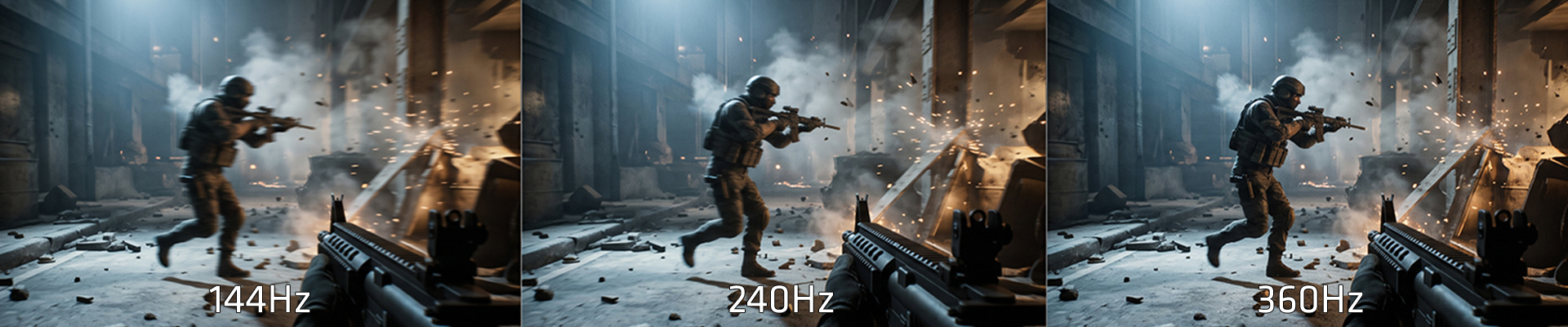
Yes, past a point, but it depends on the game and your GPU's ability to hit the frame rate that monitor needs. A competitive shooter at 240Hz feels sharper than 144Hz to most people. Past 240Hz, the gains get small enough that your reaction time, not your eyes, becomes the limiting factor.
This is a myth check for the DIY Refugee crowd: the builder who's already priced out a parts list and knows the difference between a panel spec and a marketing number. Monitor shopping gets treated like GPU shopping, bigger number wins, but refresh rate only pays off if the rest of the system can feed it.
**What's the actual difference between 144Hz, 240Hz, and 360Hz?**
Refresh rate is how many times per second the monitor redraws the image. Higher refresh rate means less time between frames, which lowers input lag and reduces motion blur during fast camera movement. The jump from 60Hz to 144Hz is obvious to nearly everyone. The jump from 144Hz to 240Hz is smaller but still visible in motion-heavy titles. The jump from 240Hz to 360Hz is the one most people argue about.
| **Refresh Rate** | **Frame Time** | **Who Notices Most** | **GPU Demand** |
| --- | --- | --- | --- |
| 144Hz | \~6.9ms | Most players, most games | Moderate |
| 240Hz | \~4.2ms | Competitive FPS players | High |
| 360Hz | \~2.8ms | Esports players, high-sensitivity setups | Very high |
**Can you actually tell the difference between 240Hz and 360Hz?**
In controlled testing, most players can detect the difference between 240Hz and 360Hz in fast-paced titles, but the margin is small compared to 60Hz-to-144Hz or 144Hz-to-240Hz jumps. The gain shows up in reduced motion blur during quick flicks, not in overall "smoothness" the way lower jumps do.
**Does your GPU matter more than your monitor's refresh rate?**
Yes. A 360Hz panel is wasted if your GPU can't sustain frames anywhere near that number. Pairing an RTX 5060 or RX 9060 with a 360Hz monitor in a demanding title means the panel is idling most of the time. An RTX 5080 can push competitive shooters like Counter-Strike or Valorant well past 360 frames at lower settings, which is where that panel earns its price. Mid-tier GPUs like the RTX 5070 or RX 9070 are better matched to 240Hz for most competitive titles at 1080p or 1440p.if
RAM matters here too. A dual-channel 32GB kit is the baseline for keeping frame times consistent at high refresh rates; single-channel or capacity-starved configs show frame time spikes even when average FPS looks fine.
If you’re running a flagship GPU for 360Hz targets, budget PSU wattage accordingly an RTX 5080 calls for an 850W unit and confirm your case clears a longer card before you buy the monitor.
**Is a 360Hz monitor worth it for casual gaming?**
For most single-player or casual multiplayer gaming, no. The jump from 144Hz to 240Hz is where the visible gains concentrate for most players, and 360Hz mainly benefits competitive shooters where split-second reaction time is the whole game.v
**What refresh rate should you actually buy?**
Match the monitor to the GPU, not the other way around. If you're running or building around a midrange GPU, 240Hz covers nearly every competitive title you'll play. Save 360Hz for a build with a flagship GPU and a game library that's mostly fast-paced shooters.
See what CPU and GPU pairing actually sustains your target refresh rate on our [configurator](https://www.clxgaming.com/gaming-pc) before you buy.
**FAQ**
**Does 360Hz require a more expensive GPU than 240Hz?
**
Yes. Hitting frame rates near 360 in competitive titles consistently requires a current-gen flagship or near-flagship GPU; a midrange card will bottleneck the panel.
**Is 240Hz good enough for competitive gaming?
**
Yes, for most players. The frame time reduction from 144Hz to 240Hz is where most of the perceptible gain happens, and 240Hz is well matched to midrange and upper-midrange GPUs.
**Will a 360Hz monitor make a weak GPU perform better?
**
No. The monitor can only display what the GPU produces. A GPU bottleneck at a capped or uncapped frame rate isn't solved by a higher-refresh panel.
## **Pc Parts Benchmark**
[**View all **](https://www.clxgaming.com/blog/pc-parts-benchmark)
[**CLXGAMING **10/23/2026**Why Your Game Looks Better on One PC Than Another**
](https://www.clxgaming.com/blog/pc-parts-benchmark/why-your-game-looks-better-on-one-pc-than-another) [**CLXGAMING **10/05/2026**How to Keep Your Windows Gaming PC Running Smoothly**
](https://www.clxgaming.com/blog/pc-parts-benchmark/how-to-keep-your-windows-gaming-pc-running-smoothly) [**CLXGAMING **10/09/2026**Desk Essentials Every PC Gamer Needs**
](https://www.clxgaming.com/blog/pc-parts-benchmark/desk-essentials-every-pc-gamer-needs)
```json
{"@context":"https://schema.org","@graph":[{"@id":"https://www.clxgaming.com/#website","@type":"WebSite","alternateName":"CLX","description":"CLX Gaming builds custom and prebuilt gaming PCs, laptops, and professional workstations for gamers, creators, and PC professionals.","inLanguage":"en-US","name":"CLX Gaming: Best PC Builder for Custom & Prebuilt Gaming PCs","url":"https://www.clxgaming.com/","publisher":{"@id":"https://www.clxgaming.com/#identity"}},{"@id":"https://www.clxgaming.com/blog/pc-parts-benchmark/144hz-vs-240hz-vs-360hz-can-you-actually-tell#webpage","@type":"WebPage","dateModified":"2026-10-26T12:30:26.263Z","datePublished":"2026-10-26T13:00:00.000Z","description":"Yes, past a point, but it depends on the game and your GPU's ability to hit the frame rate that monitor needs.","name":"144Hz vs. 240Hz vs. 360Hz: Can You Actually Tell?","url":"https://www.clxgaming.com/blog/pc-parts-benchmark/144hz-vs-240hz-vs-360hz-can-you-actually-tell","breadcrumb":{"@id":"https://www.clxgaming.com/blog/pc-parts-benchmark/144hz-vs-240hz-vs-360hz-can-you-actually-tell#/schema/breadcrumb-list/#breadcrumb"},"isPartOf":{"@id":"https://www.clxgaming.com/#website"},"potentialAction":[{"@type":"ReadAction","target":["https://www.clxgaming.com/blog/pc-parts-benchmark/144hz-vs-240hz-vs-360hz-can-you-actually-tell"]}],"primaryImageOfPage":{"@id":"https://www.clxgaming.com/#logo"}},{"@id":"https://www.clxgaming.com/#identity","@type":"Organization","name":"CLX Gaming","telephone":"+1-855-490-2569","url":"https://www.clxgaming.com","address":{"@type":"PostalAddress","streetAddress":"4747 S Emporia St","addressLocality":"Wichita","addressRegion":"KS","postalCode":"67216","addressCountry":"US"},"contactPoint":[{"@type":"ContactPoint","telephone":"+1-855-490-2569","contactType":"customer service","contactOption":"TollFree","areaServed":"US","availableLanguage":"en"},{"@type":"ContactPoint","telephone":"+1-855-490-2569","contactType":"sales","contactOption":"TollFree","areaServed":"US","availableLanguage":"en"},{"@type":"ContactPoint","telephone":"+1-316-303-1022","contactType":"corporate","areaServed":"US","availableLanguage":"en"}],"hasMerchantReturnPolicy":{"@type":"MerchantReturnPolicy","applicableCountry":"US","returnPolicyCategory":"https://schema.org/MerchantReturnFiniteReturnWindow","merchantReturnDays":30,"returnMethod":"https://schema.org/ReturnByMail","restockingFee":15,"merchantReturnLink":"https://www.clxgaming.com/warranty"},"logo":{"@id":"https://www.clxgaming.com/#logo"},"sameAs":["https://www.facebook.com/clxgaming","https://x.com/clxgaming","https://www.youtube.com/clxgaming","https://www.twitch.tv/clxgamingtv/","https://www.pinterest.com/CLXGaming/","https://www.instagram.com/clxgaming"]},{"@id":"https://www.clxgaming.com/blog/pc-parts-benchmark/144hz-vs-240hz-vs-360hz-can-you-actually-tell#/schema/breadcrumb-list/#breadcrumb","@type":"BreadcrumbList","itemListElement":[{"@type":"ListItem","name":"Home","item":"https://www.clxgaming.com/","position":1},{"@type":"ListItem","name":"Blog","item":"https://www.clxgaming.com/blog","position":2},{"@type":"ListItem","name":"Pc Parts Benchmark","item":"https://www.clxgaming.com/blog/pc-parts-benchmark","position":3},{"@type":"ListItem","name":"144Hz vs. 240Hz vs. 360Hz: Can You Actually Tell?","item":"https://www.clxgaming.com/blog/pc-parts-benchmark/144hz-vs-240hz-vs-360hz-can-you-actually-tell","position":4}]},{"@id":"https://www.clxgaming.com/blog/pc-parts-benchmark/144hz-vs-240hz-vs-360hz-can-you-actually-tell#article","dateModified":"2026-10-26T12:30:26.263Z","datePublished":"2026-10-26T13:00:00.000Z","description":"Yes, past a point, but it depends on the game and your GPU's ability to hit the frame rate that monitor needs.","headline":"144Hz vs. 240Hz vs. 360Hz: Can You Actually Tell?","inLanguage":"en-US","thumbnailUrl":"https://static.cybertron.com/clx/blog/articles/pc-parts-benchmark/144hz-vs-240hz-vs-360hz-can-you-actually-tell/144hz-vs-240hz-vs-360hz-can-you-actually-tell-small.jpg","@type":["Article","BlogPosting"],"articleSection":["Pc Parts Benchmark"],"author":{"@id":"https://www.clxgaming.com/#identity"},"image":["https://static.cybertron.com/clx/blog/articles/pc-parts-benchmark/144hz-vs-240hz-vs-360hz-can-you-actually-tell/144hz-vs-240hz-vs-360hz-can-you-actually-tell-big.jpg","https://static.cybertron.com/clx/blog/articles/pc-parts-benchmark/144hz-vs-240hz-vs-360hz-can-you-actually-tell/144hz-vs-240hz-vs-360hz-can-you-actually-tell-mid.jpg","https://static.cybertron.com/clx/blog/articles/pc-parts-benchmark/144hz-vs-240hz-vs-360hz-can-you-actually-tell/144hz-vs-240hz-vs-360hz-can-you-actually-tell-small.jpg"],"isPartOf":{"@id":"https://www.clxgaming.com/blog/pc-parts-benchmark/144hz-vs-240hz-vs-360hz-can-you-actually-tell#webpage"},"keywords":[],"mainEntityOfPage":{"@id":"https://www.clxgaming.com/blog/pc-parts-benchmark/144hz-vs-240hz-vs-360hz-can-you-actually-tell#webpage"},"publisher":{"@id":"https://www.clxgaming.com/#identity"}},{"@id":"https://www.clxgaming.com/#logo","@type":"ImageObject","caption":"CLX Gaming","contentUrl":"https://static.cybertron.com/clx/footer/clx-footer-icon-red.png","inLanguage":"en-US","url":"https://static.cybertron.com/clx/footer/clx-footer-icon-red.png"}]}
```
## Sitemap
See the full [sitemap](https://www.clxgaming.com/sitemap.md) for all pages.